Symantec Endpoint Protection Servislerini Kalıcı Olarak Durdurmak

Merhaba,

Symantec Endpoint Protection servislerini kalıcı olarak durdurmak için:

Komut satırını admin yetkisiyle çalıştırdıktan sonra aşağıdaki komutları çalıştırabilirsiniz.

** Öncesinde tamper protection kapatılmalıdır.

sc config SymEFASI start= disabled
sc config SymELAM start= disabled
sc config SymEvent start= disabled
sc config SymIRON start= disabled
sc config eeCtrl start= disabled
sc config EraserUtilRebootDrv start= disabled
Fireeye İpucu Videoları

Merhaba,

Fireeye EX, NX, HX, CMS ve FSO ürünlerine ait Fireeye tarafından hazırlanmış videolara aşağıdaki linkler üzerinden erişim sağlayabilirsiniz.

FireEye youtube kanalı: https://www.youtube.com/playlist?list=PLct3DQFrYAjgAyT64Ovx0bftDgIgdpXv7

ProductVideo
GeneralFireEye Tips and Insights Series – Updating Licenses

FireEye Tips and Insights Series: Gathering Information to Report False Positives

FireEye Tips and Insights Series: Introduction to the FireEye Health Check Tool

FireEye Tips and Insights Series: Advanced Features of the FireEye Health Check Tool
 
FireEye Security Content and Guest ImagesFireEye Tips and Insights Series – Validating Security Content And Guest Image Updates
FireEye Central ManagementCM Video – Three Ways to Clear Disk Space from the CM
FireEye HelixEmail Metadata Streaming to Helix

Self Parsing within Helix

Helix Video – Intelligence Contribution and Context

Helix Video – AWS Monitoring with Helix

Helix Video – Searching Alerts

Helix Video – MQL Introduction

Helix Video – Helix Case Management

Helix Video – Building Custom Dashboards

Helix Video – Editing a Case in Helix

Helix Video – Tuning Rule Queries

Helix Video – Hunting for Weak Indicators

Helix Video – Event Data and Parsing

Helix Video – Valuable MQL Searches

Helix Video – Searching and Pivoting

Helix Video – Archive Search

Helix Video – Investigative Tips

Helix Video – Understanding Unknown Event Data

Helix Video – Exporting Data from Helix

Helix Video – Helix Dashboard Creation

Helix Video – Introduction to Helix API

Helix Video – Access Helix API with PowerShell

Helix Video – Using Helix to Create a Custom PCI Dashboard

Helix Video – Comparing Helix Cloud Collector and Evidence Collector

Helix Video – Overview of Helix Subsearch

Helix Video – Using Helix to Create a Custom HIPAA Dashboard

Helix Video – Taking Advantage of FireEye’s Chrome Extension

Helix Video – Data Source Prioritization in Helix

Helix Video – Connecting CM to Helix to Ingest FireEye Alerts

Helix Video – Feeding Metadata & Third Party Log Event Information

Helix Video- Creating Multi-Stage Rules
FireEye Network SecurityTap Sender and Comm Broker on FireEye Network Security

Network Security Video – Five Ways to Clear Disk Space from the NX

Network Security Video – Network Security Health and Deployment Check

Network Security Video – The 4 Major Alert Types Within Network Security

Network Security Video – Getting Started With SmartVision

Network Security Video – Investigating Network Security Callback Alerts

Network Security Video – Configuring the Home Net Variable
FireEye Endpoint SecurityEndpoint Video – Endpoint Custom Login Banners

Endpoint Video – HX Rule Creation

Endpoint Video – Endpoint Triage

Endpoint Video – Containing a Compromised Host

Endpoint Video – Reviewing Endpoint Security Logs

Endpoint Video – Reviewing Endpoint Alerts

Endpoint Video – Create & Manage Host Sets

Endpoint Video – Identify Indicators of Compromise using Endpoint Security
FireEye Email SecurityEmail Security Video – Email Alert Configuration

Email Security Video – Email Security Health Check

Email Security Video – Enabling FireEye’s Advanced URL Defense Feature

Email Security Video – Gathering Information to Report False Positives
FireEye Security Orchestrator FireEye Security Orchestrator Video: Exploring the Virus Total Plugin for FSO

FireEye Security Orchestrator Video: HTTPS Listeners Plugin for FireEye Security Orchestrator (FSO)

FireEye Security Orchestrator Video: Start Event Adapters for Playbooks in FireEye Security Orchestrator

FireEye Security Orchestrator Video: Trigger FSO Playbooks and Forms Through an HTML Form

FireEye Security Orchestrator Video: Overview of FireEye Security Orchestrator Plugins

FireEye Security Orchestrator Video: FireEye Security Orchestrator Queue Plugin Overview

FireEye Security Orchestrator Video: Reading Items from the Queue within the FireEye Security Orchestrator Queue Plugin

FireEye Security Orchestrator Video: Custom Scripts Overview for FireEye Security Orchestrator

FireEye Security Orchestrator Video: Devices Overview for FireEye Security Orchestrator

FireEye Security Orchestrator Video: Adding Items to the Queue within the FSO Queue Plugin

Symantec Endpoint Protection Ajan Kurulum Hatası

     Symantec Endpoint Protection kurulumlarında “Symantec Endpoint Protection (SEP) client installation fails with a 1603 error.” hatası alıp kurulum tamamlanmıyorsa. SIS_INST.log dosyasında “C:\Program Files\Symantec\Symantec Endpoint Protection\14.3.8268.5000.105\bin64\ELAMInst.exe is not trusted. Verification result: 20” hatası varsa Symantec’e ait kök sertifikaların eksikliğinden kaynaklanmaktadır.
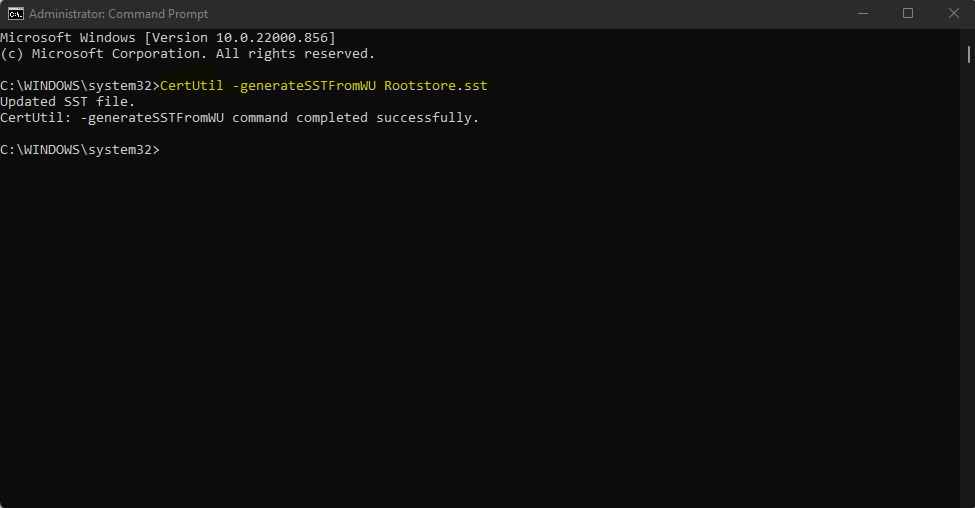
Bu sorunu çözmek için Windows güncellemesini çalıştırarak kök sertifikalarını güncellenmesi gerekmektedir. Kök sertifikalarını aşağıdaki gibi güncelleyebilirsiniz.


1. Komut satırını admin yetkileriyle açıktan sonra:
2. CertUtil –generateSSTFromWU Rootstore.sst