Symantec Endpoint Protection Manager 14.3 RU5 kurulumu sırasında ”Failed to update system configuration file” hatastını alıyorsanız ve log dosyalarında da aşağıdaki hata çıkıyorsa Bcp.exe dosyasını bulamadığı içindir. SQL ClientSDK dosyasını C:\Program Files\Microsoft SQL Server klasorune kopyalayın ve sonrasında Configuration Management Wizard’ı çalıştırınız.
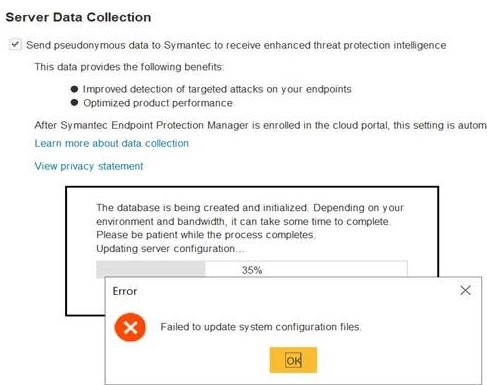
MainFrame> updatePropertiesFile>> Loading/Saving the conf.properties file failed! Exception: null
LoggerUtilities STDERR: Exception:
java.lang.NullPointerException
at java.base/java.util.concurrent.ConcurrentHashMap.putVal(ConcurrentHashMap.java:1011)
at java.base/java.util.concurrent.ConcurrentHashMap.put(ConcurrentHashMap.java:1006)
at java.base/java.util.Properties.put(Properties.java:1340)
at java.base/java.util.Properties.setProperty(Properties.java:228)
at com.sygate.scm.install.ui.MainFrame.updatePropertiesFile(MainFrame.java:1060)
at com.sygate.scm.install.ui.MainFrame.updateConfProperties(MainFrame.java:2104)
at com.sygate.scm.install.ui.MainFrame.configureDB(MainFrame.java:1605)
at com.sygate.scm.install.ui.MainFrame.nextBtnActionPerformed(MainFrame.java:4896)
at com.sygate.scm.install.ui.MainFrame$5$1.construct(MainFrame.java:4425)
at com.sygate.scm.util.SwingWorker$2.run(SwingWorker.java:151)
at java.base/java.lang.Thread.run(Thread.java:829)
 Barış İNCEİŞÇİ